
Agent modes and budget guards
Problem
Section titled “Problem”An agent run is a loop: each step is a model call, and each call re-sends the instructions, tool definitions, and conversation so far. A vague prompt can trigger a long exploration that ends in a misunderstanding and a restart.
Actions
Section titled “Actions”Pick the cheapest mode that fits
Section titled “Pick the cheapest mode that fits”| Mode | Typical shape | Use for |
|---|---|---|
| Ask | One model call | Questions, explanations, lookups |
| Plan | One planning pass | Scoping a change before any code is written |
| Agent | Many calls (tool loop) | Multi-file refactors, building a feature from scratch |
Default to Ask for questions; use Plan to clarify scope; use Agent when the task genuinely needs tools. The expensive pattern is running Agent on an ambiguous prompt.
Bound the loop
Section titled “Bound the loop”chat.agent.maxRequests— the maximum number of requests the agent can make in a run (default 25 in the VS Code settings reference we checked on 2026-11-03). Lower it if runaway loops worry you; raise it deliberately for known long tasks.- Give a clear completion criterion (“done = tests pass and lint is clean”) so the agent stops exploring.
- For complex work, have the agent write a plan file first and then execute it.
- Name the tool to use when you know it (“use only the GitHub create-PR tool”) to reduce tool searching.
- Give concrete context: files, error text, constraints (see Keep context lean).
For Autopilot or a background agent, add an explicit loop guard to the task prompt:
Run focused tests first. If the same command or test fails twice with the same error, stop and report the blocker instead of retrying in a loop.This is an instruction, not a hard enforcement mechanism; check the logs and use request or budget limits as additional safeguards.
Models and reasoning
Section titled “Models and reasoning”- Use auto model selection as a default; pin a stronger model for planning and a cheaper one for bounded implementation (see Models, planning, delegation).
- Auto is a convenient default, not a cost optimizer: confirm in the docs how it picks models before relying on it to control spend.
- Leave thinking effort at the default; raise it only for hard problems. Higher effort writes more thinking tokens (cost and latency).
- A model switch starts a fresh prompt cache: caching is provider-, model-, and deployment-specific, so switching models mid-session does not reuse the earlier cache.
Copilot cloud agent (issue → PR)
Section titled “Copilot cloud agent (issue → PR)”A cloud-agent task can consume a large amount of tokens. Reduce the start-up cost:
- Write a precise issue: acceptance criteria (tests or behavior), reproduction steps, links to relevant files, explicit scope — not just “fix this”.
- Pre-install dependencies and pre-run the build in the repository’s Copilot setup steps workflow,
.github/workflows/copilot-setup-steps.yml, so the agent does not rediscover the environment each time.
Where limits apply
Section titled “Where limits apply”Usage-based billing adds account-level budget controls on GitHub (for example per-user or cost-center spending limits) in addition to the in-editor loop limit. Check your plan’s current options in the GitHub Docs. Note that automation which calls Copilot (CI review, generated tests, scans) consumes credits on every run.
How to verify
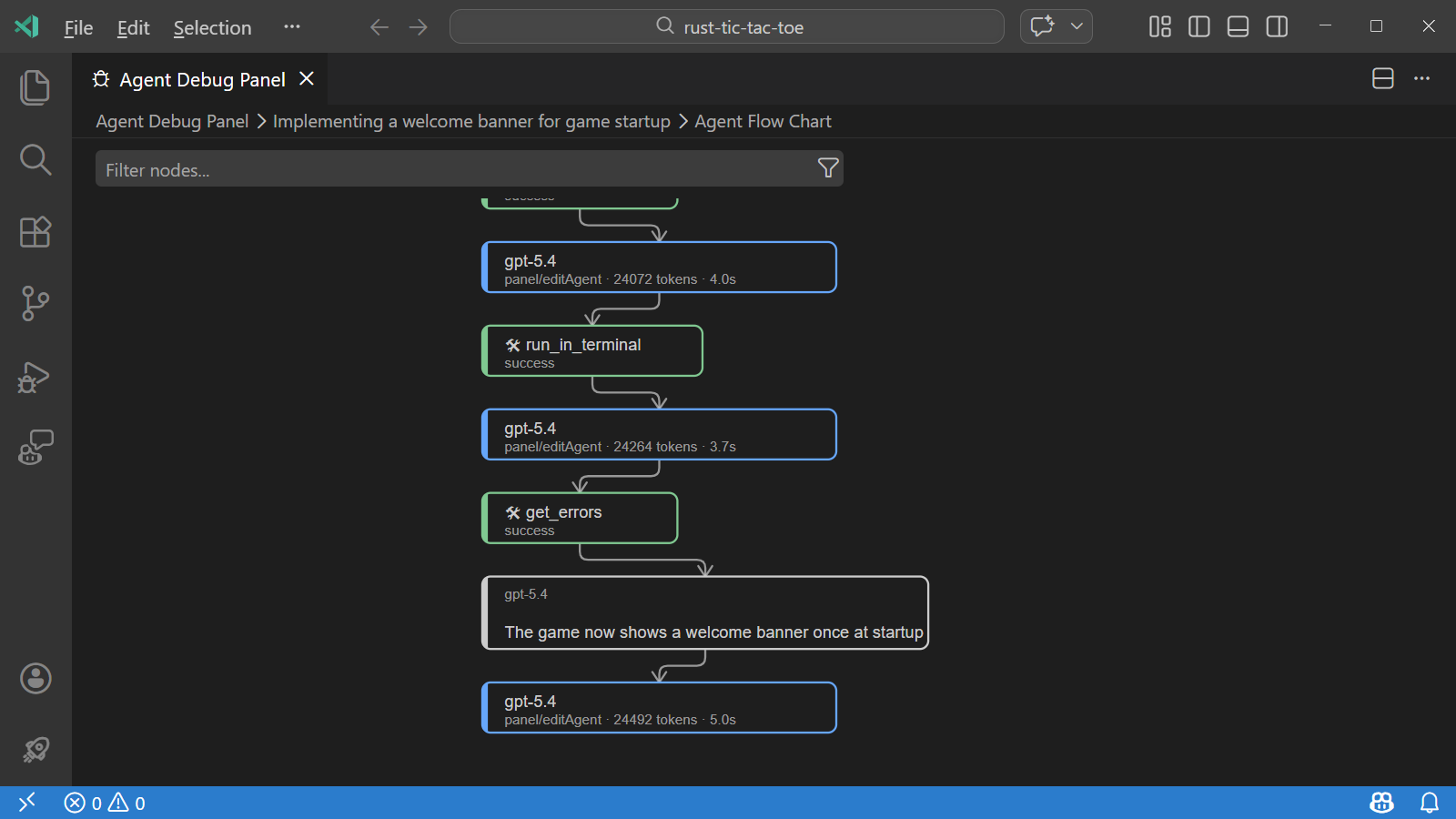
Section titled “How to verify”Run one multi-step task in Ask, Plan, and Agent where each is appropriate and compare session credits and number of tool calls in Agent Debug Logs. Confirm that the loop ends on your completion criterion rather than at the request limit.
Trade-offs
Section titled “Trade-offs”A low maxRequests can cut off legitimate long tasks mid-way (wasting the tokens already spent). Prefer a clear
done-criterion and a plan file over tight limits.
Further reading (papers)
Section titled “Further reading (papers)”Ordered by venue tier, then citations. Findings are hypotheses to verify on your own workload; see the full list in Papers.
- Training Language Models to Reason Efficiently — NeurIPS 2025, 285 citations. Trains reasoning models to trade accuracy against reasoning length.
- Token-Budget-Aware LLM Reasoning — ACL 2024, 259 citations. Estimates a token budget per problem to shorten chain-of-thought reasoning.
- Do NOT Think That Much for 2+3=? On the Overthinking of o1-Like LLMs — preprint 2024, 605 citations. Shows o1-like models spend excessive tokens on simple questions and proposes ways to cut them.
- Agentless: Demystifying LLM-based Software Engineering Agents — preprint 2024, 566 citations. A fixed localize-repair-validate pipeline competes with open-ended agent loops on SWE-bench Lite at low cost.
- L1: Controlling How Long A Reasoning Model Thinks With Reinforcement Learning — preprint 2025, 416 citations. Trains reasoning models to obey a user-specified length budget.
- Efficient Agents: Building Effective Agents While Reducing Cost — preprint 2025, 40 citations. Systematic study of the efficiency-effectiveness trade-off in agent system design.
Sources
Section titled “Sources”- VS Code Copilot settings reference (
chat.agent.maxRequests) - Optimize AI credit usage in VS Code
- Customize the cloud agent environment (copilot-setup-steps.yml)
- Token Efficiency and Context Engineering — developer talk deck (June 2026): mode comparison and cloud-agent tips (qualitative points only; the deck’s token figures are not reproduced here)