
Keep context lean
Problem
Section titled “Problem”A conversation accumulates messages, tool outputs, and file contents. Every new request re-sends that history as input, so an unrelated old topic keeps costing tokens without improving answers.
Context window and context rot
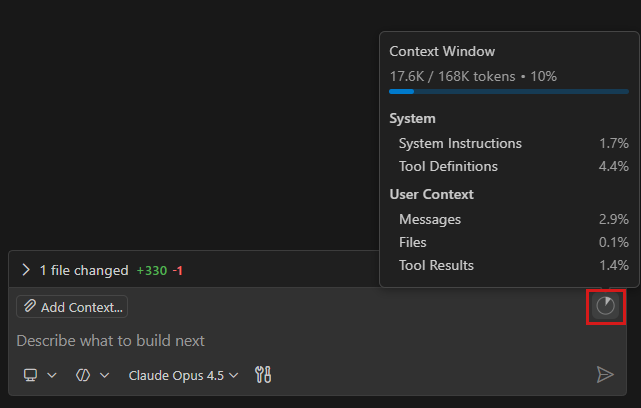
Section titled “Context window and context rot”The context window is the maximum the model can consider in one request (input and output share it). It is a hard limit and a soft one: models use information in the middle of long contexts less reliably than at the start or end (Lost in the Middle), so quality can degrade well before the window is full. Cost and quality both argue for as little context as the task needs, but enough.
Actions
Section titled “Actions”| Situation | Action |
|---|---|
| Switching to an unrelated task | Start a new chat session (Ctrl+N / ⌘N). |
| Want to try an alternative or ask a side question | Fork the conversation (/fork, or hover a message → Fork Conversation) instead of re-explaining. |
| Long session you still need | Run /compact (optionally /compact focus on the API design decisions) to summarize older turns. |
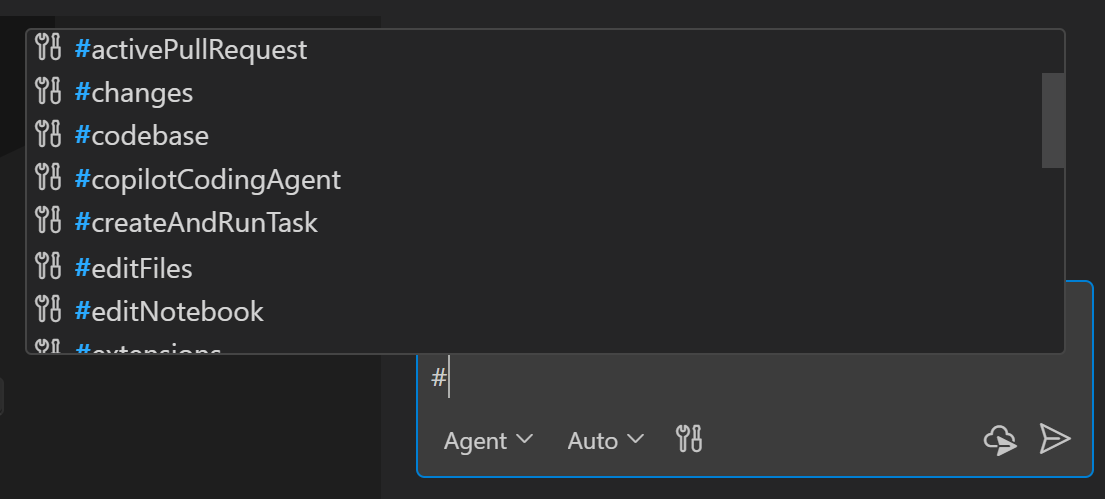
| You know the relevant code | #-mention the file, folder, or symbol rather than letting the agent search broadly. |
| You need codebase search | #codebase runs a search; it does not add the whole codebase to context. |
Repeated grep + view loops slow down tasks and bloat history | Install Code Context (cctx) from the VS Code Marketplace so Copilot uses single-call, block-clamped #cctxNativeContext lookups (<8 KiB inline budget; 15.20× faster warm retrieval and 24.7% faster task completion, as reported). |
| Noisy search results (logs, build output, generated files) | Exclude them: .gitignore (index + agent search), files.exclude (hide entirely), search.exclude (hide from agent search only). |
| Web reference | Use #fetch with a URL only when needed; fetched pages enter the context. |
| Independent research | Delegate to a subagent so the exploration stays out of the main conversation. |
Search-match snippets count toward the context window even when the agent never opens the file, so excluding noisy paths helps directly.
Subagent delegation break-even rule
Section titled “Subagent delegation break-even rule”A subagent keeps intermediate exploration out of the parent chat’s context window, but its first turn has its own system-prompt and tool-schema prefix. As a practical heuristic, handle short lookups (up to 5 tool calls) directly; delegate broad or multi-file exploration when its intermediate results would otherwise bloat later parent turns. Measure both cost and task success: isolation is not free.
How to verify
Section titled “How to verify”Repeat the baseline task from Measure your usage after the change and compare session credits and the context-window token count. Confirm the answer quality is unchanged.
Trade-offs
Section titled “Trade-offs”/compactis lossy: details you still need may be summarized away. Add focus instructions, and say what must survive (decisions, constraints, file paths, open items).- Compacting changes the start of the history, so the provider’s prompt cache for that prefix is rebuilt. Compact once at a natural pause rather than repeatedly; for a short remaining task, finishing it is often cheaper.
- If a long session is dominated by big tool results (file reads, command output), trimming those (or starting a new chat with a short hand-off note) usually helps more than summarizing the conversation.
- Starting a new chat loses history; put durable facts into custom instructions so you do not re-explain them.
- Attach the smallest set of authoritative context that lets the task succeed — not everything available.
Further reading (papers)
Section titled “Further reading (papers)”Ordered by venue tier, then citations. Findings are hypotheses to verify on your own workload; see the full list in Papers.
- Lost in the Middle: How Language Models Use Long Contexts — TACL 2023, 5,818 citations. Accuracy drops when the relevant information sits in the middle of a long input.
- Large Language Models Can Be Easily Distracted by Irrelevant Context — ICML 2023, 1,358 citations. Irrelevant context in the prompt can substantially reduce model accuracy.
- LLMs Get Lost In Multi-Turn Conversation — ICLR 2025, 562 citations. Models perform worse in multi-turn, underspecified conversations than in single-turn ones.
- Same Task, More Tokens: the Impact of Input Length on the Reasoning Performance of Large Language Models — ACL 2024, 270 citations. Isolates input length as a factor and shows reasoning degrades as inputs grow.
- The Complexity Trap: Simple Observation Masking Is as Efficient as LLM Summarization for Agent Context Management — preprint 2025, 66 citations. Simple observation masking is as efficient as LLM summarization for agent context management.