Results
The Results page is the detail view for a single BLAST search. It opens when you click a row on Recent searches or follow a /blast/jobs/<jobId> link from a submit toast.
Overview
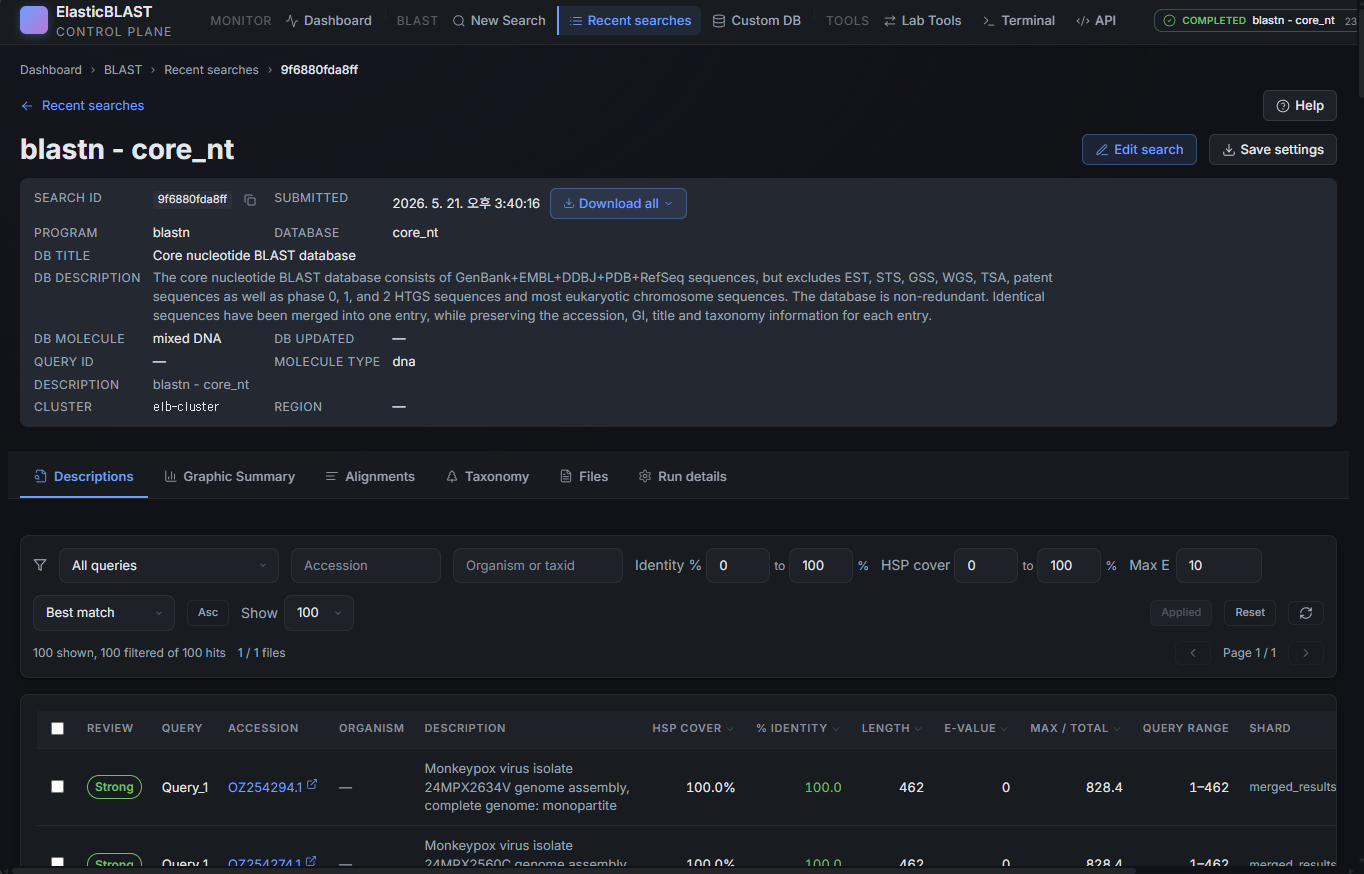
The page is built around three regions:
- Job header — NCBI-style metadata about the search.
- Sticky tab bar — switches the body between Descriptions, Graphic Summary, Alignments, Taxonomy, Files, and Run details.
- Body — the table, panel, or timeline for the active tab.
Job Header
The header is laid out in four lines, top to bottom:
- A
< Recent searchesback link plus a Help menu with links to NCBI BLAST documentation. - Job title with Cancel, Edit search, and Duplicate actions on the right. Cancel is shown only while the search is still running.
Search ID: …andCreated: …with Copy ID and a Download all results ▾ combo (BLAST XML, JSON, TSV, ZIP archive).Program: blastn Database: … Query: … Molecule: dna Query length: …— the four facts a researcher checks first to confirm "yes, this is my search".
Cluster, region, and storage account live on the Run details tab, not in the header.
Tabs
| Tab | What it shows |
|---|---|
| Descriptions | NCBI-style "Sequences producing significant alignments" table — hit accession, definition, length, score, E-value, identity, coverage. Sort and per-hit links to NCBI. |
| Graphic Summary | The familiar coloured-bar plot showing where each hit aligns along the query. |
| Alignments | Pairwise alignment view for each hit, with score/E-value/identity per HSP. |
| Taxonomy | Organism rollup of the current hit set, grouped by lineage. |
| Files | The raw result files in Storage — merged XML, per-shard outputs, support files, and (for failed runs) debug logs. Click Download to stream a file through the API. |
| Run details | Execution timeline, per-pod / per-shard status, sharding mode, warmup state, and the resolved BLAST command. |
The active tab is encoded in ?tab=… so deep links survive a reload and browser back/forward work as expected.
Run States You Will See
| Body state | When it appears | What to do |
|---|---|---|
| Result tables (Descriptions / Graphic / Alignments / Taxonomy) | The merged result file is published and parsable. | Read the hits; download from the header combo when needed. |
Search failed during the <step> step. |
The job ended in a failed state. | Open Run details for diagnostics; use the terminal only if you need to inspect logs directly. |
Running placeholder |
The job is still executing and no result file has been published yet. | Stay on the page — it polls automatically and switches to the result view when artefacts appear. |
Cannot load results — missing Azure configuration. |
No subscription or storage account is selected. | Open the Dashboard and finish the setup wizard. |
| Storage locked panel | publicNetworkAccess is Disabled and the browser is outside the platform VNet (typical for a developer laptop). |
This is the expected production posture. Either run the operation from inside the deployed Container App or use the local-debug helper documented in Storage Network Isolation & Browser ↔ Storage Proxy. |
No result files |
The run completed without publishing any usable artefacts. | Check Run details for shard-level errors; consider re-submitting with a smaller query. |
Failed runs still expose Edit search and Duplicate in the header so you can re-submit with a tweaked configuration.
Downloading Results
The Download all results combo in the header streams a packaged artefact through the API. The combo offers BLAST XML, JSON, TSV (descriptions), and a ZIP that bundles every shard output.
For individual files, switch to the Files tab and download row-by-row. Downloads always go through the API sidecar — the browser never receives a Storage SAS URL.
Screenshot Targets
Screenshots for this page are defined by this manifest target:
results-desktop
Use a completed demo job with a small query (for example the monkeypox sample used in the API Reference) so the Descriptions tab is populated. Mask UPNs, subscription IDs, full storage account names, and any private query identifiers before publishing.